

The CKMI AI Roadmap: How to Earn Your Way to Copilot

Hey folks, if you’ve been following along with the CKMI (Company Knowledge Management Index) series, like the definition of the index or the guide on migrating to SharePoint—you know the deal: Generative AI is not magic dust.
Its transformative power, embodied by Copilot (our coveted CKMI Level 5), is entirely dependent on the high-quality knowledge foundation you build beneath it. That strategic conversation on “Copilot Readiness” was the high-level view.
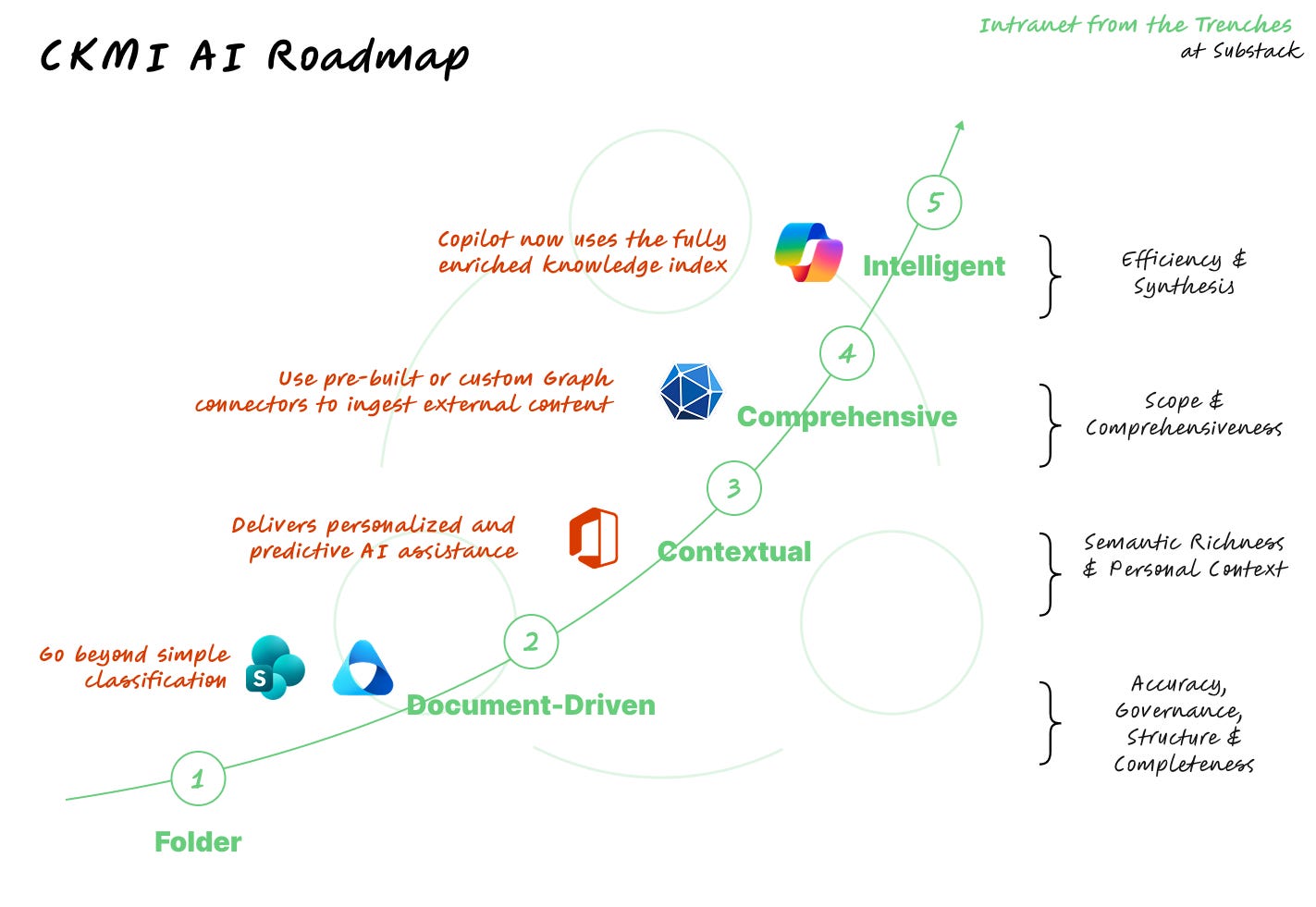
Now, it’s time to get surgical. You know you need to move from Level 1 (Siloed Chaos) to Level 5 (Integrated Intelligence), but how do you leverage your existing Microsoft 365 investments to execute that leap? The answer lies in mastering the Classic AI tools - Classification, Extraction, and Indexing - that act as the non-negotiable groundwork for Generative AI success.
This article is a comprehensive, step-by-step roadmap. We are now mapping the specific, non-generative Microsoft 365 tools—like Purview and SharePoint Premium—that are absolutely required to clean, structure, and contextualize your corporate knowledge.
The path to Generative AI runs directly through Classic AI. Let’s map the journey.
Level 1 to 2: From Folder-Based to Document-Driven
You’ve successfully migrated your content from old network drives to SharePoint, but it’s essentially unstructured documents dumped into folders. This is file share chaos on the cloud, where search is frustratingly keyword-dependent and governance is minimal.
The first major milestone is to introduce consistency, taxonomy, and reliable metadata. This is where you begin to inject Classic AI to clean up the mess. There are two primary tools that helps us reach the next level: Microsoft Purview and SharePoint Premium (formerly Syntex).
Microsoft Purview: Classifiers & Sensitivity Labels
You need to implement sensitivity labels and custom trainable classifiers to automatically categorize documents. For instance, Purview can automatically identify and tag documents as “HR Policy”, “Sales Contract”, or “Financial Report”. This classification is critical because Copilot will respect the permissions and policies enforced by these labels.
CKMI Gain: The Accuracy & Governance score increases. Content becomes trustworthy because users know it has been classified, and findable because it has a reliable identity.
SharePoint Premium
Next, go beyond simple classification by using SharePoint Premium’s document understanding models. These models are trained to extract key fields (like an Invoice Number, a Contract Expiration Date, or a Client Name) and automatically populate them as SharePoint columns (metadata).
CMKI Gain: The Structure & Completeness score increases. Your documents are no longer just flat files; they are structured data records that are easily queryable and provide high-quality data input for the Semantic Index.
Level 2 to 3: From Document-Driven to Contextual
With your content fully structured, the next stage is to connect the dots and introduce meaning across the enterprise. Your content has high-quality metadata, but the collective knowledge remains fragmented. Documents are well-tagged, but the conceptual map linking disparate projects, themes, and people is missing.
We need to create a unified, conceptual map of the organization’s knowledge and add operational context. Search becomes semantic and predictive.
The Semantic Index & Work IQ
This is an intelligence layer automatically deployed by Microsoft, but it relies entirely on the work you did in Level 1. It consists of:
The Semantic Index: Understands relationships between content based on the quality data you provided in previous levels.
Work IQ: Tracks connections between people, tasks, and work habits across Teams, email, and meetings.
Your key action here is passive but critical: ensuring the quality of the prior steps (Purview/Premium) maximizes the effectiveness of this deep intelligence layer. Garbage in, garbage out applies here more than anywhere else.
CKMI Gain: Semantic Richness & Personal Context score increases significantly. Work IQ delivers personalized and predictive AI assistance, moving knowledge from simple concepts to contextualized intelligence that understands how your team works.
Level 3 to 4: From Contextual to Comprehensive
No business runs purely inside Microsoft 365. Critical data almost always lives elsewhere. Your internal M365 knowledge is connected and semantically rich, but vital information sits outside the ecosystem (Salesforce, SAP, internal SQL databases, Confluence, etc.).
To achieve a true 360-degree view of company knowledge, you must integrate external data sources into your central search index.
Microsoft Graph Connectors
Use pre-built or custom Graph connectors to securely ingest external content into the Microsoft Search index. This content is then available for the Semantic Index to process, allowing you to apply the same classification and security policies you established in Level 1. This is the first explicit step to expand the Semantic Index beyond M365.
CKMI Gain: Scope & Comprehensiveness score increases. The knowledge base is now truly holistic. Copilot, in the next stage, can answer questions that require data from external systems, like “What is the status of project X in Jira and who is the account manager in Salesforce?”
Level 4 to 5: From Comprehensive to Intelligent
You have prepared the ground. Knowledge is structured, contextual, and comprehensive. The stage is perfectly set.
Now, you are ready for the transformative power of Generative AI. We are transforming knowledge retrieval from merely searching and linking to synthesized answers and automated actions.
Copilot for Microsoft 365
Copilot now uses the fully enriched knowledge index (structured by SharePoint Premium/Purview, semantically connected by the Semantic Index/Work IQ, and broadened by Graph Connectors) to synthesize, summarize, and draft content based on the entire secure knowledge base.
CKMI Gain: Efficiency & Synthesis score is maximized. Knowledge retrieval time plummets from minutes of searching to seconds of synthetic, secure answers.
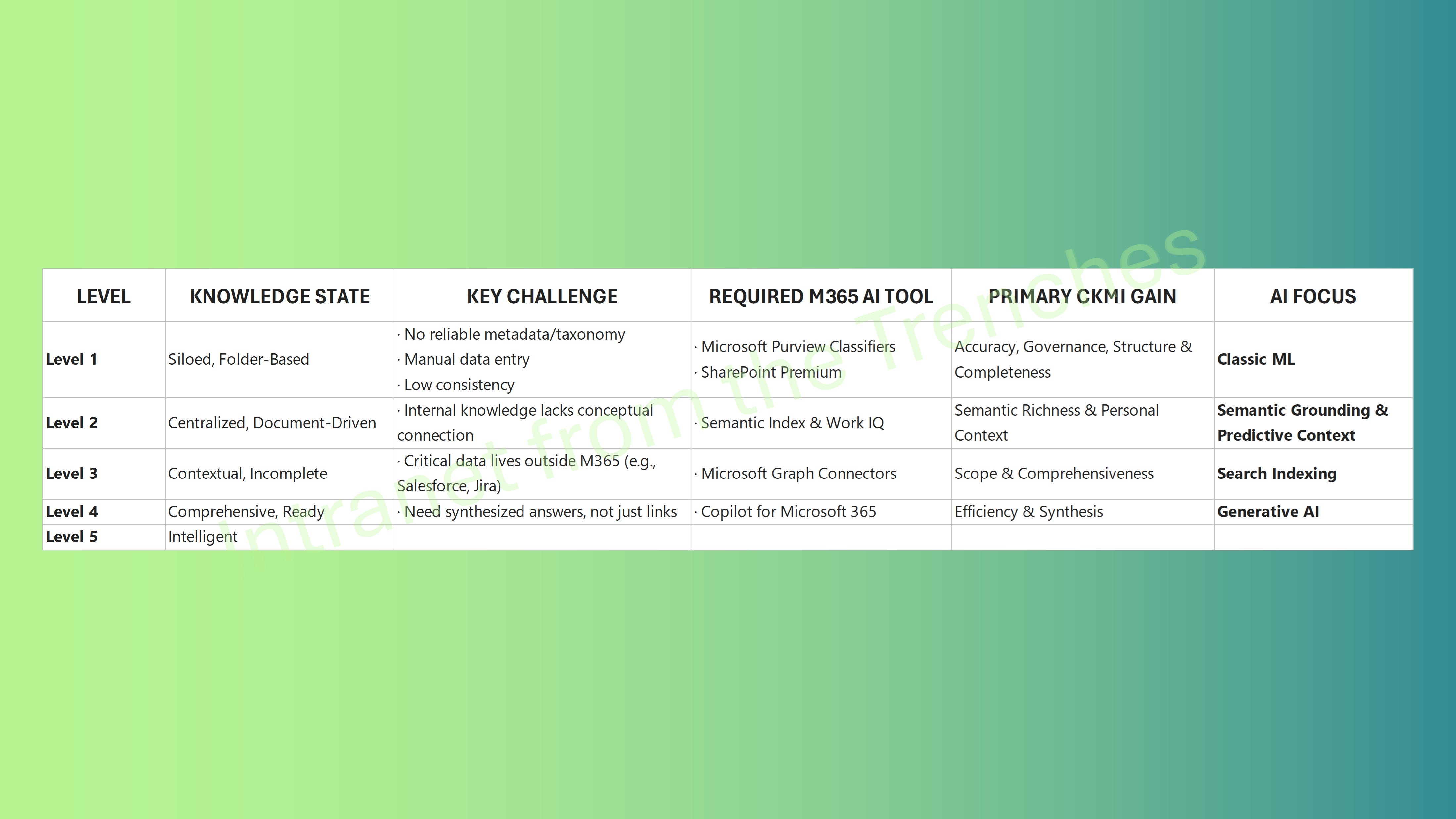
The CKMI AI Roadmap Cheat Sheet
For a quick reference on which tool applies to which stage of maturity, save this cheat sheet:
Conclusion
The biggest mistake organizations make is viewing Generative AI as a magical solution to organizational chaos. In reality, you must earn your way to Copilot (Level 5) by diligently implementing the foundational AI tools in Levels 1 through 4.
If you skip the steps of classification (Purview) and structuring (SharePoint Premium), you are handing Copilot a messy, untrustworthy data set. The result is the Generative Trap: AI generating fast, but useless or insecure, content.
Don’t buy a Ferrari for a muddy road. Structure your knowledge first. Structure your knowledge first. Start with Purview and SharePoint Premium today to begin building the semantic layer needed for true AI knowledge management. In our final article of this series, we’ll explore what lies beyond Level 5—the ultimate, self-driving state of knowledge management, where the AI becomes agentic.
References
The Knowledge Management Maturity Index: https://intranetfromthetrenches.substack.com/p/the-knowledge-management-maturity-index
SharePoint Migration: Boost Your CKMI Score & AI Readiness: https://intranetfromthetrenches.substack.com/p/sharepoint-migration-boost-your-ckmi-score-and-ai-readiness
Automation in SharePoint: Beyond Power Automate (Yes, There’s Way More Than You Think): https://intranetfromthetrenches.substack.com/p/automation-in-sharepoint-beyond-power-automate
Get started with sensitivity labels: https://learn.microsoft.com/en-us/purview/get-started-with-sensitivity-labels
Document processing for Microsoft 365 documentation: https://learn.microsoft.com/en-us/microsoft-365/documentprocessing/?view=o365-worldwide